
Technology & Software
AI Assisted Ticket Flow
Translating the Team’s accumulated knowledge into better and faster outcomes.
Overview
Getting a support ticket to resolution takes more than understanding the reported problem. A technician needs to know the client’s environment, what has happened before, what has already been tried, and which next steps make sense. Gathering that context takes time, even when the company already holds the answers.
We built our AI-assisted ticket flow around two goals: shorten the path to completing a ticket, and bring our accumulated experience into every investigation. It prepares investigations across network issues, general support, service requests, and security, combining current evidence with what our Team already knows about the client. A Team Member reviews the findings, decides what to do, and works with the client.
The knowledge has somewhere to go, too. Findings and corrections become part of a shared client record that later investigations can use.
“Every investigation should benefit from what the company has already learned.”
Breadth and Depth
More kinds of work, with more context
We began with network investigations and expanded into support, service requests, and security, backed by a richer record of each client. More of the helpdesk tickets now arrive with useful preparation: a Wi-Fi complaint, a laptop that won’t sign in, a request to add someone to a shared mailbox, and a suspicious sign-in alert each get an investigation shaped for that kind of work.
Each investigation brings together more than the ticket. It reads the current evidence from that client’s systems, the procedure our Team follows for that kind of request, the client’s known quirks, previous incidents at that site, and what earlier investigations found. A technician opens the ticket with the context gathered and a working theory on the table, instead of beginning from a blank page and a dozen logins. The report leads with that theory and the next step for a person to take, then shows its evidence.
Knowledge
What we learn becomes available next time
The relationship runs in a loop. Investigations use what the company already knows about a client. The work produces new findings. People correct and extend them. Later investigations begin with that accumulated record.
Each client has a shared record, built first from a year of our own tickets, documents, time entries and conversations (that work has its own case study) and added to by every investigation since. When a Team Member replies in the report’s thread or corrects a finding, the correction lands on that client’s record, credited and dated, and in how the next ticket of that kind is handled. A reply of “too shallow” tunes how deep the next investigation of that kind goes, and a request to skip a kind of ticket for a client becomes a routing rule the same day.
Two kinds of knowledge are in play, and only one of them can be assembled from records. Processing a year of tickets and documents gathers what was written down. What a technician knows but never wrote down, the closet that runs hot, the contact who approves changes, the fix that only looks like a fix, still has to come from the Team, as corrections and additions to the record. The system gives technicians more room for judgement, client relationships and the difficult decisions, and in return it depends on their judgement to stay right.
“The record gathers what was written down. The Team adds what it knows.”
Building on What Exists
Built on work we had already done
Expanding from network tickets to the rest of the helpdesk took about a week, because much of what it needed already existed. The connections to every platform we manage, built first for our Team and then for support.agent, are the same ones Macktez Monitor collects through. The network and security investigation steps were already written down as skills in our support toolkit, and our standard operating procedures were already in Drive. What we built new was the routing, the methodology for support and service-request tickets, and the client records that give every investigation what we already know.
The Right Tool
The right tool for each step
Preparing an investigation for every ticket that needs one, and only those, has to be affordable and dependable, or it stops. So each judgement goes to the simplest tool that can make it reliably. Ordinary scripts handle the known rules. A small classifier model answers the narrow questions: what kind of ticket this is, whether a person wrote it, how urgent it is. Rules and the classifier determine which tickets need investigation. A more capable model gathers and interprets the evidence, read-only and on that client’s systems only, and a Team Member decides what happens next.
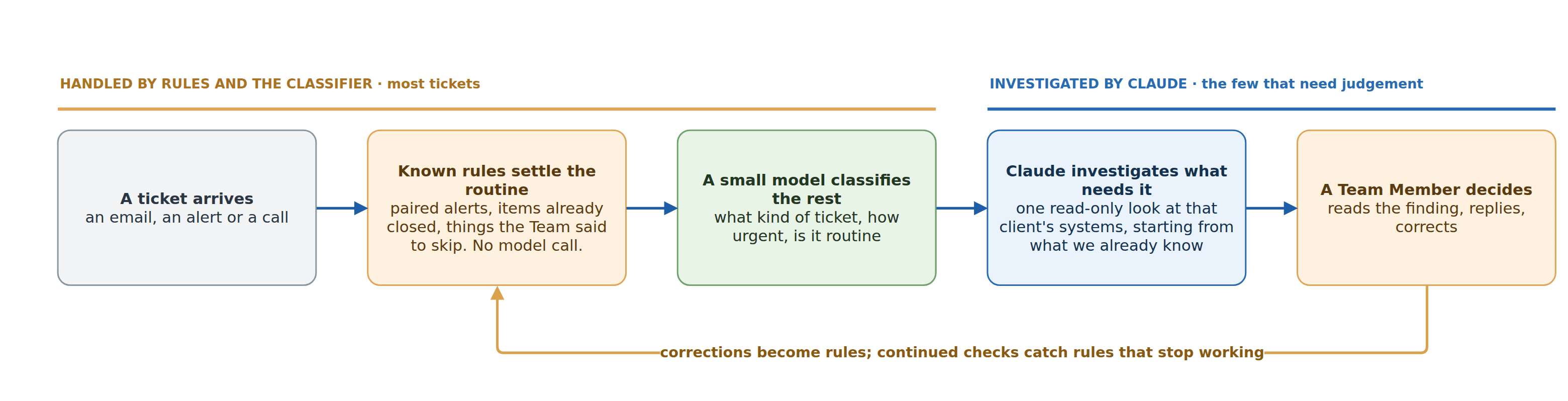
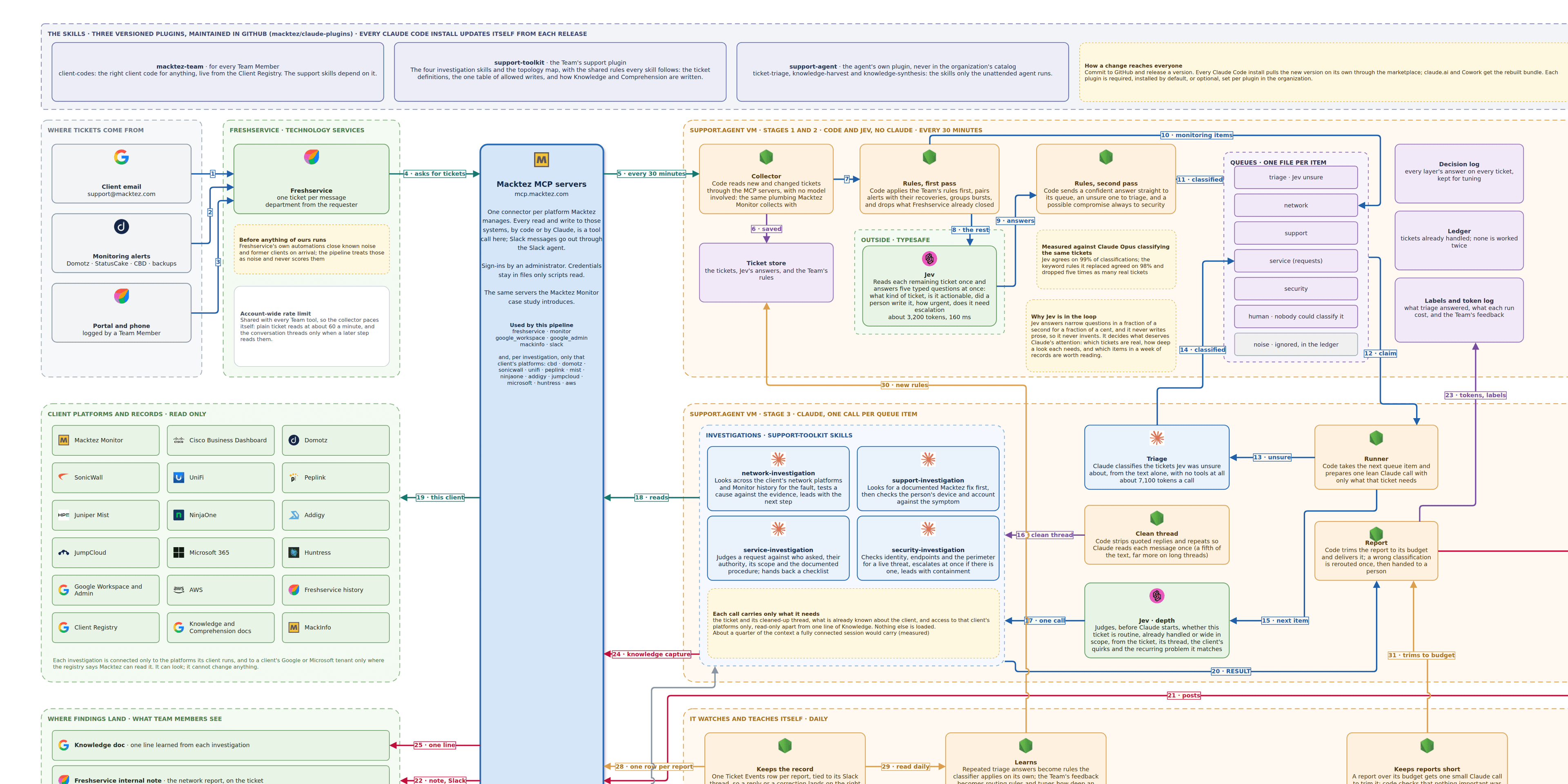
Each step gets only the information and access it needs. See the technical design for every step, what a report contains, the measurements behind it, and the full diagram.
Measuring
What we measure
The goal is a shorter path to resolution and investigations the Team can depend on, so we measure both. We track whether tickets close sooner and how much work is repeated, against the weeks before the change. Before any change to the flow goes live, we replay a week of real tickets through it and compare the new answers with the old ones. And we test the client records the same way: the same tickets investigated with and without them, judged for errors, missed next steps, and how useful the technician found the starting point.
For Clients
Where to start
Most organizations have spent years developing their people’s expertise, and most of it is reachable only by asking the person who has it. We start with the work your team already understands. Together, we decide what can be prepared automatically, what requires a person’s judgement, and what each completed task should contribute to the next.
That’s the work we do with clients: connecting AI to your systems through scoped connectors, giving each agent only the access it needs, and logging every action so it can be reviewed. Putting Past Work to Work covers how we built the client records the investigations start from.
Technical Notes
The technical design
Every step of the flow, what a report contains, where it started, the replayed-week measurements, and the full diagram.
Technical Notes
The technical design
For readers who want the detail behind the story above: every step of the flow, where it started, and the measurements behind the numbers. Every figure here comes from our own logs and records, except where it is marked as an estimate.
The flow runs every 30 minutes, and most of what it does involves no model at all. Scripts collect new and changed tickets through our existing connections, pair each alert with its recovery, group a burst of alerts from one site into one item, and drop whatever the helpdesk’s own automations have already closed. Only what is left goes to the classifier. Jev reads each remaining ticket once and answers several questions at the same time, each from a fixed list of answers: what kind of ticket this is, whether it is actionable, whether a person wrote it, how urgent it is, and whether it reports a compromise. Jev picks from answers we define in advance instead of writing text, so it can still pick wrong, but a narrow answer is easy to check and easy to route. That costs about 3,200 tokens and 160 milliseconds a ticket.
A confident answer sends the ticket straight to its queue. An unsure one goes to Claude, which classifies it from the text alone, with no tools attached, for about 7,100 tokens a call. A possible compromise always goes to the security queue, whatever else Jev said. For each queued ticket, one Claude call then runs the matching investigation, read-only and on that client’s platforms only, starting from the client’s reference. An investigation runs between about one and 2.7 million tokens, median by skill, most of it re-reading context it already holds. Scripts trim the finished report to its budget, post it as a note on the ticket, and hand it to Slack for a Team Member.
The Report
What a technician receives, and what comes back
Every report has the same shape, led by the decision and backed by the evidence: a summary with a stated confidence, recommended next steps for a person to take, the root-cause analysis, then the assumptions, the tools called, the evidence, the history at that site, and what remains unknown. A typical report on a slow-Wi-Fi complaint, simplified, reads like this:
- Reported: Wi-Fi is slow in the second-floor conference room, since this morning.
- History: the same room was reported twice in the past year. Both times a neighboring network on the same channel was the cause, and a channel change resolved it.
- Network evidence: the room’s access point is up and busy, its channel is crowded by a network that appeared this week, and the switch port and uplink show no errors.
- Device evidence: through device management, the requester’s laptop shows a strong signal to the right access point on the 5 GHz band, current Wi-Fi drivers, and no VPN or bandwidth-heavy process running, so the laptop isn’t the cause.
- Confirmation: a short packet capture on the access point shows retransmissions and airtime lost to the neighboring network, which matches the theory.
- Suggested next step: move the access point to a quieter channel and confirm with the client. A draft note to the requester is attached for a Team Member to send.
No single source would settle that ticket. The access point says the channel is crowded, the laptop says the client is healthy, and the capture shows the interference is real. Connecting every platform we manage is what lets one investigation read all three and arrive with a theory that has already been tested.
The report is the start of the ticket, not the end of it. The technician still confirms the theory, decides, makes the change, and talks to the client. What comes back shapes the flow. When two client records said a connector could not read a client’s directory sign-in events, a Team Member knew it could; a check returned 1,031 events for one day, and the records now carry that correction, credited and dated. Repeated decisions become reusable rules, and continued checks catch any rule that stops working.
Where It Started
The first agent, and what it cost
The first agent woke every 30 minutes during business hours, read the helpdesk, picked out network tickets by their subjects, and ran a full investigation with Claude. It read the client’s documentation, checked their network platforms, and wrote a note on the ticket and a summary in Slack. The notes were useful, and the Team came to rely on them.
Then we measured it. In the week we studied, only 66 of 331 runs found a ticket to work on. The other 80% spent a full investigation’s worth of effort confirming an empty queue, because the cost was set by the clock rather than by the work. It also covered network tickets only. The current flow fixed both problems at once: scripts and the classifier decide whether there is anything to investigate, so a quiet day costs almost nothing, and the same machinery routes support, service-request and security tickets as readily as network ones.
Measurements
What the replayed week showed
Before the new flow went live, we replayed a week of real tickets through it and compared its decisions with the old agent’s. The table shows where each ticket was settled.
| Stage | In | Settled there | Passed on |
|---|---|---|---|
| Monitoring rules | 95 alerts and backup repeats | 85 | 10 network items |
| Helpdesk automations | 899 other tickets | 408 closed on arrival | 491 |
| Jev | 491 | 321 noise | 81 to investigation queues, 89 to Claude to classify |
| Claude | 179 queue items | 89 classification calls, 90 investigations |
In that week, 994 tickets led to 179 calls to Claude. On classification, Jev’s answers agreed with Claude’s 99.3% of the time and dropped one real ticket as noise; the keyword rules it replaced agreed 98.1% of the time and dropped five. That figure is agreement with Claude rather than independently measured accuracy, and the same Claude labels guided our choice among Jev variants, so we treat it as evidence that the classifier makes the same calls, not proof that those calls are right. Urgency is handled accordingly. Jev’s escalation answer, with our rules on top, caught 11 of the 18 cases Claude marked urgent, so urgency is a flag that brings a ticket forward, not a gate that decides anything, and a person still judges it.
Measuring also changed the design. When Claude classified a ticket with its usual tools and connectors attached, each call cost about 185,000 tokens. Giving it only the ticket text cut that to about 6,900 with the same answers. We would not have guessed that without measuring, and it is the kind of finding that makes a flow affordable enough to keep running.
Model charges are not the whole cost, so it is worth being precise about them. Building the flow ran on one month of a premium Claude plan, about $125, plus about $6 of Jev. It now runs on the standard plan, about $25 a month paid to Anthropic plus a few cents of Jev, at the prices when we built it. None of that counts the Team’s time to design, build and supervise it, which is the larger investment and the one that made the rest work.
In Short
The technical design, in short
Scripts collect and filter tickets through the same connections our Team uses every day. A small classifier answers the narrow routing questions for a fraction of a cent each. Claude investigates only the tickets that need judgement, read-only, on that client’s systems, starting from what we already know about the client. Every finding lands with a Team Member, and the Team’s corrections become rules and records the next ticket starts from. In the replayed week, 994 tickets led to 179 calls to Claude, the classifier agreed with Claude 99.3% of the time, and the flow now runs for about $25 a month in model charges.
If your organization has a queue like this, a steady stream of requests where a few need real judgement and the rest follow patterns your people already know, we can build the same thing on your systems: the connections, the routing, the knowledge, and the review. Tell us about the queue, or start with how we put AI to work.
Start With One Task
Which part of your team’s work keeps repeating?
Pick one recurring task. Write down what follows a rule, what requires judgment, and what the next person should learn from doing it. Then tell us about it, and we’ll help you sort the steps.
Let’s TalkRelated
For the connections and guardrails underneath it, see:
For the fundamentals behind models, agents and tokens, see our University guides: