
Technology & Software
Meet support.agent: Our First Fully Autonomous Digital Employee
How custom MCP servers connected every system we manage — and what changed for our Team and our clients once an agent could use them
At a Glance
- Client
- Macktez (internal)
- Problem
- Most support work is the same loop: go to several platforms, look at what each one says, decide what is going on, then act. Every step was a person clicking through consoles, and none of that clicking taught anyone anything.
- Approach
- Write a custom Model Context Protocol (MCP) server for every platform we manage so an AI can reach all of them, then give an agent its own identity, its own permissions, and the ticket queue.
- Outcome
- support.agent, an agent with its own identity that works the ticket queue around the clock — network and security investigations, and a growing list of other work. Clients get faster answers grounded in more evidence, and the Team spends its time on judgment instead of tab-switching.
The End State
A colleague you will never meet
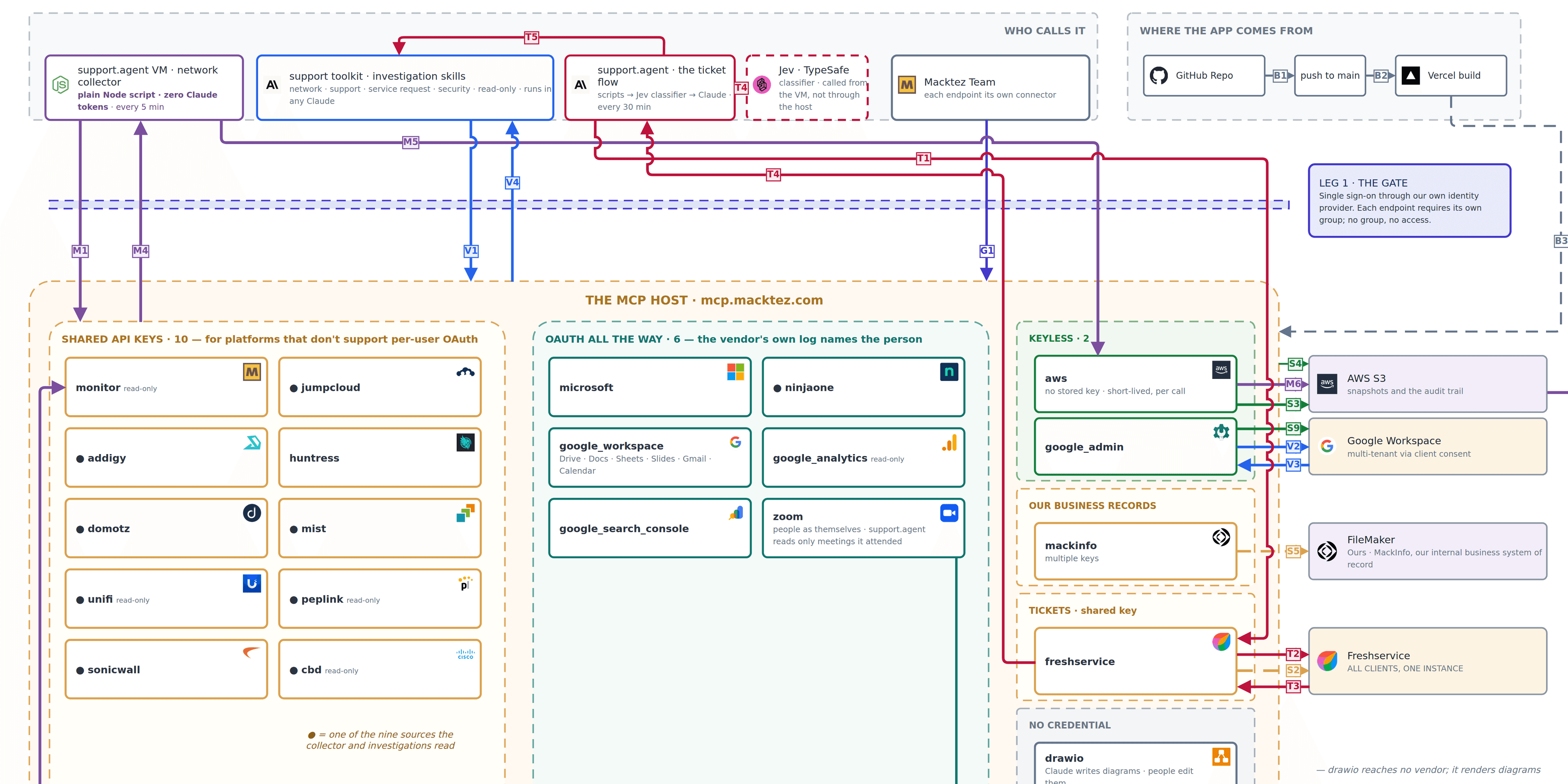
Every 30 minutes, support.agent signs in and reads the ticket queue. It picks out the tickets that look like network problems — the Wi-Fi is slow, a printer disappeared, the office lost internet for a minute — and goes to work. It pulls the current state from the wireless controller, the firewall, the switches, and device management. It checks what our monitoring remembers about that network over the past few days. It looks up which client, which site, and which hardware is involved. Then it writes what it found onto the ticket, posts a summary in Slack, and files its notes in Google Drive.
By the time a Team Member opens that ticket, the evidence is gathered, the timeline is laid out, and there is a working theory on the table. What used to be the first twenty minutes of every network ticket is already done.
Network problems were only where we started. support.agent also runs security investigations. When a sign-in looks wrong, or the endpoint-security platform raises an alert, it pulls the sign-in history, the alert detail, what the device was doing at the time, and who the person is, then lays the sequence out in one place. Assembling that picture by hand is exactly the kind of work that is urgent, tedious, and easy to do incompletely at the end of a long day.
The notes are the part that compounds. Every investigation leaves a durable record for that client — how their network normally behaves, which alerts turned out to be noise, what the problem was last time and what resolved it — and later runs read those notes before they start. The second investigation at a site begins with what the first one found. The agent gets better at a given client the longer it works there, and nobody has to write that knowledge down by hand. Under the old way, the twenty minutes a person spent gathering evidence vanished the moment they closed the ticket.
support.agent is not a chatbot bolted onto the help desk. It is our first fully autonomous digital employee. It has its own identity in our directory, the same way a new hire would. It can only see the systems its role allows. Everything it does is logged under its own name. And it works on its own schedule, without anyone asking it to.
It is not a replacement for anyone, and it never changes anything on its own. It investigates on a schedule and produces internal findings; a Team Member decides and carries out changes. support.agent works in service of a person: every finding lands in front of someone who checks it, decides, and acts. That human in the loop is how we do quality control, and it is not optional. Getting more of this to run without a person watching means treating quality control and security as the whole job, not an afterthought.
Still, this is the thing all the excitement about AI has actually been about: not a better search box, but software that shows up, does real work across real systems, and hands a person the result. The rest of this story is how we got here, working backwards from the problem.
The Problem
Look, decide, act — across dozens of systems
Nearly every support task has the same shape. Go to several platforms. Look at what each one says. Decide what is going on. Act. A ticket that says “the Wi-Fi is slow in the conference room” touches five systems before anyone can say what is wrong, and every one of them has its own login, its own screen, and its own way of describing the same office.
For as long as this industry has existed, a person did all of that by hand. Sign in here, find the right page, copy out a number, sign in there, compare, repeat. It is slow. It depends on the individual knowing where everything lives. And it produces nothing of lasting value: clicking around a dozen windows to collect logs does not teach anyone anything. It is minutiae, and nobody was learning from it.
The thinking part — what does this pattern mean, what should we do about it — was never the bottleneck. The gathering was. We wanted to hand the gathering, and the first pass at investigation, to a computer.
Why Now
Computers could not talk to all these systems — until now
The reason nobody automated this years ago is that it was genuinely hard. Every platform has its own way for software to talk to it: different sign-in, different vocabulary, different shape of answer. Writing a program that spoke to all of them, and could reason about a fuzzy ticket in plain language, was out of reach.
Two things changed. Large language models supplied the reasoning: an AI can now read “the Wi-Fi is slow” and know what to check. And the Model Context Protocol (MCP) supplied the connection. MCP is a common language that lets an AI use outside tools instead of only answering from memory. A custom MCP server is a wrapper around one platform — a Rosetta Stone that translates that vendor’s particular dialect into the one language the AI understands, carries the actual requests, and returns the answers in a consistent form.
Few of the platforms we manage offered one, so we wrote our own for each and host them together at mcp.macktez.com. Even where a vendor does offer an MCP server, it often exposes only part of the platform, gives us little say over who can use which tools, and keeps no record of who did. Building our own meant we could cover every tool we need, decide permissions ourselves, and keep our own log. Once every system spoke the same language, an AI could reach all of them — and so could an agent.
How It Came Together
People first, then agents, then a dashboard
The first payoff was for the Team. A Team Member opens Claude, asks about a client’s network in ordinary words, and the assistant gathers the evidence from every platform — including MackInfo, our system of record for clients, jobs, and billing — and answers with the sources attached. Each Team Member connects the platforms their role calls for, behind the same sign-in they already use for everything else.
The connections do not care whether a person or a program is asking. So the steps a Team Member follows on a network ticket could be written down as skills, the start of what we now call the support toolkit, and handed to an agent with its own identity. That agent is support.agent.
The list of work it takes on keeps growing. Adding a workflow now means writing down what a Team Member does by hand and checking that the agent can reach the systems involved — which, by this point, it usually can. Network investigations came first, security investigations followed, and the queue of candidates is longer than the list of what it does today.
How the queue is sorted today, and how each investigation starts from what we already know about the client, is the subject of AI Assisted Ticket Flow.
The same connections then gave us monitor.macktez.com. Every 5 minutes a simple script — no AI involved — asks each platform how things stand and saves a snapshot. The dashboard checks those snapshots against our rules for every client at once: is a device offline, is a link degrading, has a configuration changed, did last night’s backups finish. It keeps the history too, which is where support.agent learns what “normal” looks like for a network before deciding what is unusual.
Working Alongside the Team
A colleague in Slack and on Zoom
support.agent doesn’t only work the queue. It’s a member of our Slack, and the Team talks to it the way they’d talk to a colleague. Ask it a question in a direct message and it answers from the same platforms and client history it uses on tickets. Reply in the thread under one of its reports and it picks that investigation up where it left off, instead of starting over. Tell it a finding missed the mark, or went deeper than the ticket needed, and that feedback shapes how it works the next one.
It connects to Slack the way the Slack app on a laptop does, by opening its own connection out to Slack. (Slack calls this Socket Mode.) Nothing on its machine sits open to the internet waiting for messages to arrive.
It joins our Zoom calls, too. When a Team Member on its roster is in a Macktez meeting, support.agent joins and appears in the participant list as Support Agent, and anyone can ask it to join from Slack. Its presence is the consent: everyone on the call can see it, and the host can remove it at any time. Afterward it can read the transcript of a meeting it was present for, and only those meetings, and every read is logged.
That’s how calls become knowledge. Each week, support.agent reads what changed across tickets, Slack, calendars, and meeting transcripts, and proposes updates to each client’s reference documents, checked against their sources before anything is published. A decision made on a call can be in that client’s notes the following week without anyone writing it up. How those references were built in the first place is the subject of Putting Past Work to Work.
None of this widens what it’s allowed to do. In Slack and on Zoom it has the same read-only reach it has everywhere else: it can draft a reply, and a person decides whether to send it.
Guardrails
What a digital employee is allowed to do
Giving software its own identity and access to every system is only a good idea if it is governed at least as well as a person would be. A few principles do most of the work.
support.agent only investigates. It never changes a setting, restarts a device, or replies to a client. Those decisions stay with a person, who now makes them with the evidence already in hand. The connections that exist to answer questions are built so they cannot change anything — a tool that alters a system simply cannot be added to them — and where changes are possible, reaching them takes a second, separate permission.
It uses exactly the same sign-in, permissions, and logging as any Team Member, because it uses exactly the same connections. There is no looser path for software. Where a vendor only offers shared keys, we use more than one: people with read-only access work through a key that can only read, and the separate key that can make changes is used behind the scenes only for those with elevated permissions.
We keep our own record of who did what. Some vendors let our connection sign in as the individual and log the person themselves. Many others cannot tell who is using a shared key, so we log every request through every connection against the Team Member or agent who made it. We can answer who did what on every platform we manage, including the ones that were never built to tell us.
A record is only useful if someone reads it, so we also built tripwires. When something high-risk happens, an alert posts within moments in a Slack channel the Team watches. That makes them a governance tool and a security tool at once. They show us when a person or an agent steps outside how they normally work, and those are the same signals an attacker would set off first.
- Someone tries a connection or a tool they aren’t authorized for. They’re refused, and we hear about it.
- An agent does something outside its normal pattern.
- Sign-ins or activity that don’t fit the person or agent behind them, such as from an unexpected place or at an unexpected pace.
Alerts say what happened and who was involved, and leave out the raw details, so the channel is safe for people and support.agent alike to read.
For Clients
Faster answers, grounded in more evidence
The point of all of this is what happens on the other end of the ticket. When a client reports a problem, the first response now comes with the evidence already gathered from every system involved, not from whichever console someone happened to open first. The answer is faster, because the gathering took minutes instead of a chunk of someone’s afternoon. And it is better, because it is grounded in more data than a person would realistically pull by hand for a routine ticket.
The Team’s time moves to where it matters: judgment, conversation with the client, and fixing the thing. The minutiae nobody was learning from is gone. And because the same connections serve people, agents, and dashboards alike, the next workflow we hand to a digital colleague — a report, a scheduled check, a client-facing status page — will cost a fraction of what the first one did.
support.agent grew out of the broader rollout described in Operationalizing AI Across Every Department, and we built it the way we built this website — with Claude Code, on the same identity backbone (see Vibe Coding, Done Right).
Outcomes
What we built.
- support.agent: an agent with its own identity, working the ticket queue every 30 minutes — network and security investigations, and a growing list of workflows — and handing a person the evidence, without ever changing a client system
- A custom MCP server for every platform we manage, so an AI — or an agent — can reach all of them in one language, hosted together at mcp.macktez.com
- One interface for the Team: any Team Member can ask a question that spans every system, from Claude, in plain language
- Durable per-client notes from every investigation, read back on later runs so each one starts from what the last one found
- monitor.macktez.com: network, server, and backup health for every client, snapshotted every 5 minutes, with no AI in the loop
- The same sign-in, permissions, and logging for people and agents alike, with each platform its own door and roles deciding which doors open
- Question-only connections that cannot be given the ability to change anything, separate keys for read-only and elevated access, and a separate permission wherever changes are possible
- Our own record of who did what on every platform, including the ones whose vendors cannot tell
- Tripwires that post high-risk activity by people or agents to Slack within moments
- support.agent in Slack and on Zoom: a colleague the Team can message, that resumes an investigation from a thread reply, joins Macktez calls in plain view, and folds what was said into each client’s references every week
- Faster, better-grounded first responses for clients, and Team time moved from clicking to judgment
Automate With Guardrails
Curious what an agent could prepare for your team before anyone opens the ticket?
Tell us what repetitive support work is eating your team’s time, and we’ll scope what is safe to automate, with the audit trail to prove it.
Let’s TalkRelated
For the platform and guardrails behind it, see:
For the fundamentals on how AI agents actually work and how access should be scoped, see our University guides:
For more on how we put AI to work safely, see these case studies: